
rFactor 2 Build 906
Rejoice! ISI’s build 906 for rFactor 2 begins to move the title’s antiquated UI system from Y2K to the present day with the introduction of a new launcher. The launcher controls tasks such as activation, updating, mod downloading, installation and verification. In the near future you will be able to also join races directly from the launcher as well, a nice feature.

Besides the launcher, build 906 packs a few other meaningful updates (and a bunch of bug fixes). Analog gauges become usable in this build. Updated AI parameters in the dev mode AIW editor have been added for the modding community. Graphical updates such as color re-balance, gamma and HDR improvements have been implemented as well.
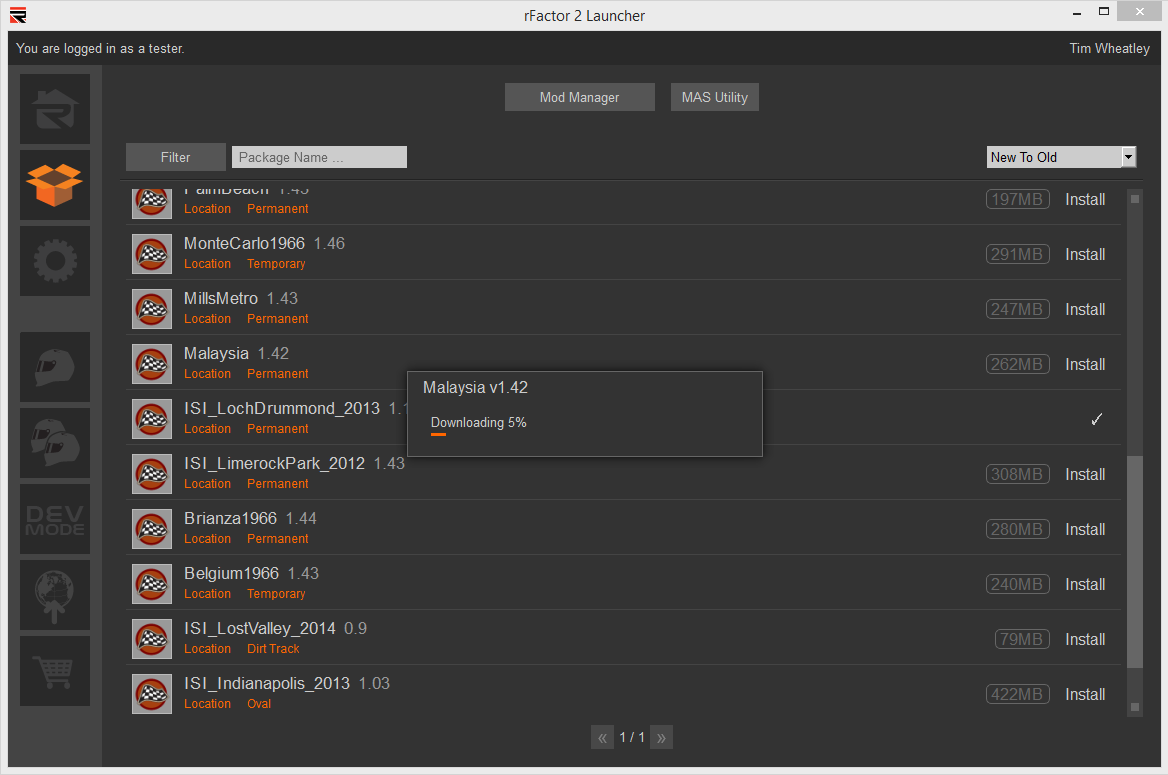
Overall a nice build. Excited about the much needed UI updates. The build 906 changelog can be seen in its entirety at the bottom of the page.
And as always, if you do not own rFactor 2 yet you can download the demo featuring the Corvette C6.R, Formula Renault 3.5 and Silverstone Circuit here.
rFactor Greenlit on Steam
First, yes, rFactor not rFactor 2 has been greenlit for Steam. This is not a typo. In preparation for offering rFactor 2 on Steam, ISI decided to work the kinks out on rF1 so rF2 would be implemented into the Steam universe smoothly. Now that the title has been approved – thanks to you fans who voted for it – ISI will get its wish.
No timeline on when it’ll show up on Steam but I hope it shows up at a very inexpensive price point so as many people as possible can try it out (and because its as old as dirt…not the game Dirt but the literal dirt in the ground).
Build 906 Changelog
FEATURES:
————-
Added code to allow non-linear analog gauges.
Added some feedback to 3 AI parameters to dev mode AIW editor (corner caution:, understeer throttle cut:, understeer lat) so that you can watch in realtime as they have an effect.
New Launcher UI.
New remote content package manager integrated with Launcher UI.
Simplified activation process.
Sync Manager now restarts Launcher after update installation with original permissions.
BUG FIXES / OPTIMIZATIONS:
————-
Fixed intermittent crash on vehicle load.
Fixed rain volume which became too loud for some reason.
FXAA fix for monitor.
Fix for extraneous window in ded server mode.
Possible fix to 1st time failure downing vmod install failure on game connect in cases where vmod and components already downloaded but not installed.
Set lower default spotter volume.
Changed the small rfm, veh, and track main page display buttons to not load an image if their image size is set to 0 in either dimension. This is to prevent crash if a UI should have them on the same page as one of another gizmo that uses those assets (and destroys them).
Fixed bug with options not always remembering rfm/vehicle/track list/menu preference.
Fix for replays not loading some *.mas skins. (skins shared over multiplayer may still not load)
Potentially fixed names running over the HUD menus with a new HUD parameter & a fixed algorithm.
Fixed 64 bit Dev Mode inablity to save AIW files.
Fixed a potential crash upon starting AIW editor.
Fixed pit menu selected box from being too small in some cases.
Fixed HUD message center messages from extending beyond the box in some cases.
Fixed bug where virtual vehicles created with a *.mas loose skin file instead of a *.dds skin file wouldn’t show the correct skin in the spinner or on track.
Fixed a rare buffer overrun error in track name text display.
Changed replay letterbox to extend the entire width of the screen instead of just inside the options extent.
Attempted fix for occasional vehicle load/unload loop that appeared to cause network lag.
Fixed some multiplayer “Get Mod” issues with downloading/installing components and cleaned up the UI to be more readable.
UI / HUD / OPTIONS:
————-
Added APP_TextValue_GarageTireLoad_FrontLeft, APP_TextValue_GarageTireLoad_FrontRight, APP_TextValue_GarageTireLoad_RearLeft, APP_TextValue_GarageTireLoad_RearRight Gizmos back. (not yet used in default options)
Created gizmos for replay mode, length and current position. (not yet used in default options)
Renamed “binkanimations” to “genericanimations” since they not longer use bink
Added HUD parameter for pit menu maximum length.
Added an “instant update” parameter to vehicle and track lists for options that forgo the “accept”/”cancel” mechanism.
MULTIPLAYER:
————-
Broke up installing of downloaded components on multiplayer join so that the options have a chance to update and get a little bit of ui feedback to the user about what the game is doing
GRAPHICS
————-
Modified scene post-gamma value to improve color balance.
Ambient boost removed, no longer needed with improved scene gamma.
Improved some HDR automation parameters.
HDP files now deprecated and are disabled by default. HDP files can still be enabled via the plr file option ‘Enable Legacy HDR Profiles’.
Removed specular floor value, which was causing incorrect highlights at night.
CONTROLLERS / FFB:
————-
Added a Controller.JSON value “Steering Torque Capability” in order to specify the strength of strong FFB wheels (like direct drive). If this is set properly, and it exceeds the NominalMaxSteeringTorque for a given vehicle, it allows a 1:1 correlation between the calculated torque and the actual FFB torque. (However, note that we still don’t model power steering, so the calculated torque is stronger than it should be for some vehicles.)
Increased the number of buttons per controller supported.
MODDING / PUBLIC DEV:
————-
Updated the component mas file loading (for tracks only) to remove irrelevant layout mas files.
Dev Mode: When editing AI driver parameters we now change the driver to match selected car in the editor window automatically when bouncing between cars
PLUGINS:
————-
Set the mLastImpact* variables in the telemetry plugin interface.
Made plugin interface to add chat messages work on dedicated servers.
Fixed a few things with the Internals Plugin weather interface, and added a new option to apply cloudiness instantly.
Anything that updates the UI and graphics is a welcome addition, as far as I”m concerned. Looking forward to trying it out. Thanks, ISI.
The controls for adjusting everything just feels PS1 quality, although the graphics are less than iRacing by far, they are at least better than a PS3 and they do work in triple screen. I am glad to see they are addressing their weak areas. I look forward to trying them again when they update the Rfactor2.
hmmm….I had so many problems with this game when I bought the lifetime license last spring that I deleted it after a few months. I will download 906 and try again! Thanks, ISI
: )