
Slightly Mad Studios (SMS) have released patch 2.5 for Project CARS on the PC, fixing a number of bugs. Highlights of the patch include fixes to alleviate a wide range of game crashes, pitting and setup bugs, a false start bug for online races, new Force Feedback (FFB) Calibration screen, added support for the Logitech G29 and G920 and stiffer tires on modern street cars.
Speaking of the Logitech G29, Darin has put together an unboxing and in-depth look video showing off the G29’s performance in Project CARS (albeit the PlayStation 4 version).
As far as updates to the PlayStation 4 and Xbox One versions of Project CARS, some of the features and improvements seen here will make their way to the consoles in patch 3.0.
Check out the entire release notes below and additional information from SMS’s Bruno Alexandre covering the new FFB settings.
Project CARS –PC Patch 2.5 – Release Notes
Game Crashes
We spent a lot of time working directly with a number of users who were struggling with game crashes, and resolved as many of these as we could. The various fixes in this patch should help a great deal in making the game more stable for those of you who were experiencing these instabilities.
Pitting, tuning, setups
* Fixed a case where the in-game tuning Setup was not being saved under certain conditions.
* Fixed the issue with cold and current tyre pressure mismatches in pitstop strategy, as well as cold pressure not being correctly applied in the tyre system.
* Ensure that the Default pitstop strategy is selected as the Active one when starting a new session.
* Fixed an issue where the wrong vehicle setup would at times be applied to the player’s current vehicle.
* Fixed another case of where cars would sometimes leave the pits with an invisible reattached wheel.
* Fixed an issue with the Pit Strategy screen where the displayed values did not reflect the saved settings.
* Fixed an issue in online races where the pit crew would ignore any changes made to the pit strategy once the player’s car was stationary in the pit box.
* Reworked some tyre compound names as displayed in the setup screen to ensure that all compounds are named to be indicative of the type of compound it represents in the pit strategy screen.
* Restrict the selectable pit strategy tyre compound types to only those available for the current vehicle.
Online
* Fixed an issue where the Drive button would remain permanently locked when joining an in-progress session.
* Fixed an issue where, when the player progressed from qualifying to the start of the race, the player’s car would sometimes begin moving without player, resulting in false jump-starts.
Controls
* New Feature – Implemented the ability via menu sliders for the user to manually tweak the menu spring strength, stationary / low speed spring strength, and overall steering gain.
* New Feature – The Force Feedback Calibration screen now features a multiple force feedback profile selection whereby the user can select a base FFB style that suits personal preference, and then tweak it further as desired. This will then create a ‘Custom’ entry in the profile selection list in addition to the current options: “Default” (matches the FFB default settings in Patch 2.0) and “Classic” (matches the FFB settings in the original release).
* Fixed an issue with sudden loss of FFB after a crash.
* Reduced the strength of the menu spring for custom wheels.
* Fixed an issue where Mouse controls were showing a deadzone in the centre regardless of deadzone setting.
* Fixed an issue where rumble on the gamepad could at times cause the game to slow down.
* Added support and profiles for the Logitech G29 and G920 on PC
* Added accelerator slip vibration to the wheel rim of Fanatec wheels where available, and fixed brake rumble not working.
Vehicles
* Formula A – Added a new tire set which now includes two slick tires – soft and medium. Also rebalanced the heating and wear across all four tyre sets. Wear will now more closely match real-world Formula cars. Heating is more even front to rear also. Further rebalancing of the AI speed as was required, and tweaks to the base setup to accommodate the heat change.
* Modern street cars – New stiffer tyres for improved drivability to more closely match the real world experience, making these cars more fun and engaging to drive. Made tweaks to the individual setups of the FWD and most Supercars to accommodate the change.
* Mclaren P1 – Stiffened up the default suspension to help prevent bottoming out at tracks like Nordschliefe.
To add some information about these new settings.
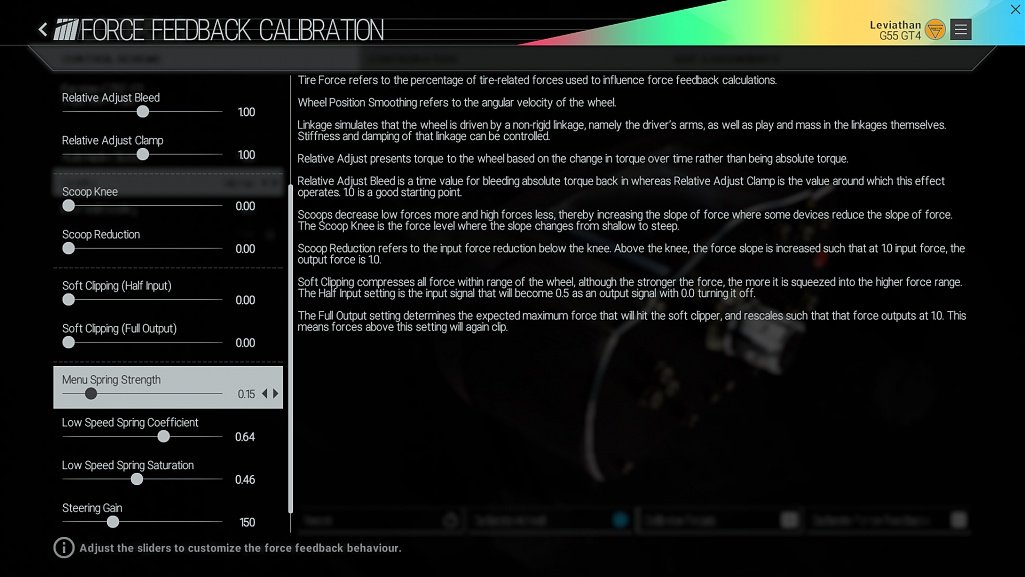
You can now switch between current FFB settings (Default) and pre-1.4 (classic) by using the FFB Calibration presets, these presets are available under Options > Controls > Calibrate Force Feedback, the presets are set on top of this page and the 4 new sliders to control the spring/steering effect are at the bottom. Whenever you change these values it becomes a custom preset and you can still go back to either Default or Classic by selecting them at the top of this page.
New Sliders Description:
Menu Spring – The strength of the wheel centering spring in the front end and in-game pause menu.
Low Speed Spring Coefficient & Saturation – The weight of the steering at slow speeds (<10mph) and when the car is stationary. The saturation is the maximum force for the spring and the coefficient is how quickly the spring takes effect. To avoid “cogging / notching” effects when stationary its best to leave the spring coefficient high and lower the saturation.
Steering Gain – The gain (multiplier) applied to all steering effects (steering force, jolts, kerb rumble etc) after they have been mixed. For a clean more detailed experience set at 1.0 or below, for stronger feedback at the expense of clipping set higher (maximum value 5).
NOTE: In case your game is not set to english the new sliders might appear with an empty text, use this image as reference (ignore the values set). It will be fixed!
Just downloaded the 2.0 update for my ps4 last night, hadn’t played it for a while. I was hoping that it would give some keyboard support. Did not see it.
keyboards do work maybe try mapping the keys 1st then it works
Really looking forward to this. I’m hoping it’ll fix a problem I’ve had with the gaming occasionally crashing when I use my mouse in the main menus. Sometimes, when the game boots up and I’m in the menus, the game will crash/freeze/lockup when I select anything with my mouse. I’ve updated my drivers across the board and nothing seemed to help. Anyway, fingers crossed.
It was released in Steam for sure – I have it.
This is odd. It’s still showing that I’m at 2.0 and is making no attempt to download/install the 2.5 patch. I’m going to have to verify game cache and make sure my install has not been corrupted.
Hi there how do you download this patch or how do I know which patch I am on. Because no updates that I can see when opening the game on steam. Please any help thanks
l wish I could tell you but I’m still only showing Patch 2.0 (as of June 30th). I have automatic updates turned on, obviously, but still no version 2.5 for me either.
There’s a notice in the News section that Patch 2.5 has been released, as of July 17th, but I’m not seeing it as part of my install.
Very strange.
The support for three screens is awesome!…. Such a great game.
How can I auto update the PCAR