

Studio 397 have released their first complete rFactor 2 build 1108 for the popular PC sim racing title! The build is a Steam only build, Studio 397 states that they began with” optimising and automating the entire build process and setting up a new internal bug tracking system” which will aid in speeding up public releases, fixes and features. Furthermore, we are told the first build focused on ”fixing bigger issues such as video driver crashes, optimising and fixing elements of the workshop and starting work on improving the stock car and oval experience.”
New team members have been recruited to improve upon graphics, user interface, infrastructure, content and overall optimisations. These improvements will become more visible to players of the title within the first quarter of 2017. The main focus in build 1108 has been concentrated on developing and testing ”Stock Car” with special attention being paid to the series’ rules. Utilising several dedicated team members, the studio was able to identify and address crucial issues within the stock car and oval environments. Improvements under caution, more flexible options for server admins and oval behaviour optimisations of the AI in single player mode for short ovals have been worked on.
Subsequent to the release of build 1108, Studio 397 have recently released the first update to the build with the following explanation:
After releasing build 1108 about a week ago, we got a lot of good feedback from the community and also some bug reports. As always, we very much appreciate your input, even though we cannot always respond to every report individually. We previously explained that we spent some time optimizing our development process, so it should come as no surprise that we’re releasing this update now. This is not the last bugfix we will do, but it is probably the last one we’ll do this year. So from Studio 397, we wish you all a happy new year! The Steam BuildID for this update is 1543400, and you can check your BuildID by opening the Steam Client, going into the library, then right click on rFactor 2 to open the context menu. From there, choose “Properties” and in the window that opens select the tab called “Local Files”. The “Current content BuildID” is mentioned there.
You can read the full list of changes and improvements for both build 1108 and update 1 here below. One thing is quite apparent, Studio 397 is building a talented team of developers that will take rFactor 2 to new heights. With a modestly aggressive roadmap, we can hope to see more improvements, as well as new content at a quick-fire pace!
Steam Winter Sale!
If you do not own rFactor 2 or are contemplating purchasing it, you can take advantage of the Steam Winter Sale where you can pick up the game $15.99 or €14,99 until January the 2nd, a saving of 50%! This discounted price includes multi-player!
Changes for Build 1108 update 1:
- Added an empty “Packages” folder to the dedicated server and to rFactor 2 itself. Both distributions were missing this folder, which caused some confusion.
- Fixed an issue with nonexistent workshop items. If you were subscribed to a workshop item that was subsequently removed or made invisible to you, Steam would continue to report you as “subscribed” to that item. Because the item no longer exists, it would, however, cause our Launcher to hang whilst waiting for it to download, which could never happen, of course. We’ve made the code more robust and tried to detect all such cases, so you should no longer experience this issue.
Complete list of changes, improvements and fixes for Steam only build 1108:
Stock Car
- The safety car is now set to ‘non-collidable’ by default – testing has shown this can help avoid certain oval-related caution situations in which the safety car has trouble weaving its way to the front of the field. The value can be set to ‘collidable’ in the player.JSON file by editing the following values: “Safety Car Collidable”: true. After this update, we recommend server admins backup and remove player.json and multiplayer.json, so that new ones are generated containing all new options and defaults.
- Several minor adjustments and tweaks to help optimize scoring.
- Further improvements to the track order of cars leaving the pits under caution.
- Fixed a bookkeeping error under caution with one lap until restart.
- Changed AI behaviour to prevent pitting on the last lap of a caution. This helps to avoid messy and disorderly restarts and it makes the AI look a bit smarter too.
- Added an extra message to the Low Speed Information pop up: “Please pass the safety car.” This should help you be more aware of where you are with respect to the safety car under a full course caution and should improve sorting overall as drivers no longer have to guess whether to pass the safety car.
- Changed pit exit behaviour to allow cars to be placed in a large gap rather than behind the whole field, which might be nearly a full track length behind the car exiting on some of the smaller ovals.
- Fixed pit behaviour: A car entering the pit lane after a race resumes from a caution will no longer be able to continuously lap the field during the next caution.
- Fixed a possible scoring mix-up when a full course caution was called while the race leader was in the pits.
- Fixed a bug in which cars starting late from the garage area (those that did not press the Race button in time), after the field had gone ahead, were sometimes wrongly scored at race start. Cars starting late from the garage area now have to wait for the entire field to pass the pit-exit line to be able to join the race and go on track.
- Added a new single player feature “AI Formation by Position” that when set to “true” in the player.json attempts to line up the AI during yellow flag/formation laps according to your position behind the pace car instead of relative to surrounding cars. This seems to work better on short ovals, whereas the old (default) way might still work better for road courses.
- Added new options for configuring an oval server, which can be found in the CustomPluginsVariables.json:
- Added two types of double file which can be configured by editing the value “DoubleFileType” where “0” is off (or single file), “1” will ignore lapped and pitted distinctions, and “2” (the default) is standard double file.
- Wave-arounds can now be set to on or off for more flexibility by editing the following value: “WaveArounds” “0” is off, “1” is on.
- Added the ability to configure number of caution laps by editing the following value: “YellowLapsMinimum”
- Added the ability to configure random number of caution laps editing the following value: “YellowLapsRandom”
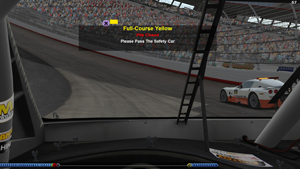
Better awareness of what to do under caution.
AI
- Fixed AI behaviour to prevent them from taking off immediately after what should be their pit stop following their final qualifying lap, which would get them disqualified.
- Fixed AI behaviour to prevent AI from getting disqualified during qualifying on certain tracks where it is difficult to pit immediately after completing n-1 laps.
Physics
- Added a new TGM display. While driving, it was possible to pull up a graph showing the contact patch for each tyre that showed the temperature of the tyre at that point of the contact patch (ALT =). The second display now shows the tyre load.
- Changed TTool filename. TTool, a tool that is used to generate tyres for cars, used to output a file named “QSA” when you ran a real-time batch test. That filename has now been corrected to “realtime”.
- Fixed an issue where camber angles for tyres reported as zero in real-time telemetry instead of their real angle. Also, this now allows plugins to see the correct angles.
Driver Swaps - Fixed occasional crash when a wheel gets reattached/repaired during a pit stop at the same time as a driver swap.

Temperature and load of the tyre contact patch.
Graphics
- Fixed the multiview gizmo that allows you to enter your triple screen configuration. It now saves and remembers asymmetrical monitor configuration parameters.
- Fixed sporadic nVidia driver crash on certain tracks. The fix, which is only needed if you were experiencing driver crashes and restarts, can be activated by changing the value WorkaroundFlags=1 in the Config.ini with a text editor. Please make sure to delete your shader cache manually (the files in UserData\Log\Shaders) when making this change.
- Removed the option to disable HDR.
Dedicated Server
- Changed the logic so that the dedicated server properly moves on to the next track in all cases regardless of which sessions are active.
User Interface/Launcher
- Added an Engine Mixture setting to garage so it can be saved as part of a car setup.
- Updated Launcher icons.
- Added new user interface background image and splash screen.
- Fixed Launcher to work correctly in Steam’s offline mode. It will no longer hang while attempting to download pending workshop items in this mode.
- Updated French language dictionary.

Engine mixture settings are part of the setup.
Additional Changes
- We’ve made racing online free for every user of rFactor 2.
- Fixed results file when VehFile uses escape characters.
- Removed DRS enabled/disabled messages for tracks without DRS zones.
- Added +skipmonitor as a command line option, which lets you enter from and exit a race directly to the main menu.
