
Disclosure: Moza Racing provided the featured product(s) for this Moza FCS Review. We also sell Moza Racing products through Sim Motion. All opinions are our own.
Fair question. Inside Sim Racing covers racing wheels, pedals, and rigs, not tractors. So when Moza reached out about a new control panel built for Farming Simulator and Construction Simulator, the honest reaction was: why not? This Moza FCS review comes from someone who’s driven forklifts and rented a tractor. Dug a few holes in a friend’s excavator too, but never touched Farming Simulator before. Turns out that’s basically the whole qualification requirement here. Boot up Farming Simulator 25 for the first time and you realize the genre runs deeper than most racing sims ever do.
That’s the lens for this review. You’re not getting a farm sim veteran’s take on the FCS. You’re getting a first-timer’s take on whether the hardware makes sense, feels good, and does what Moza says it does.
Moza FCS Review: What the Hardware Actually Is
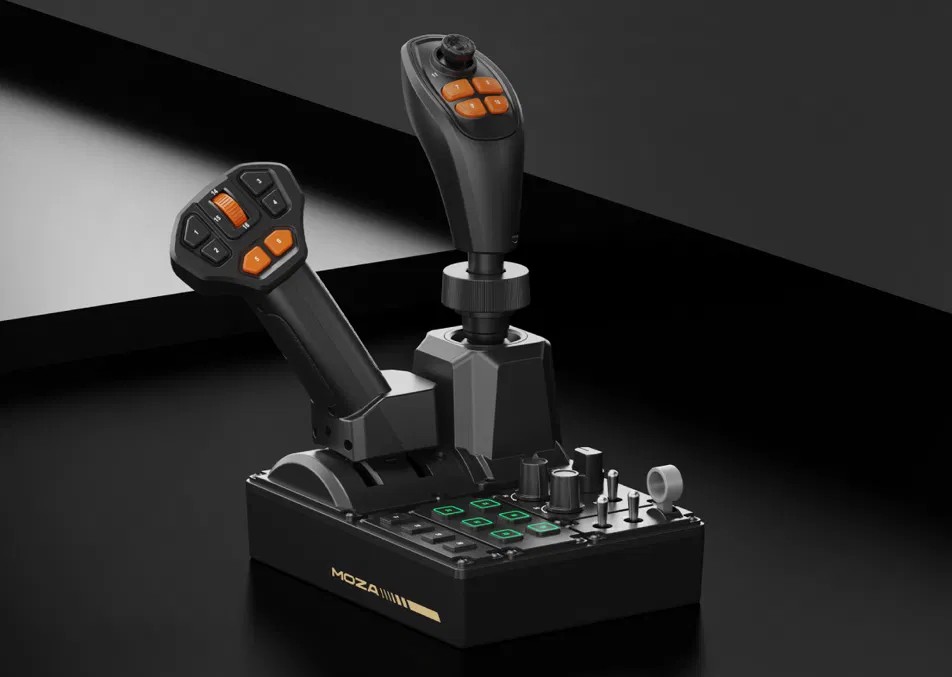
The FCS (Farming Control System) is Moza’s dedicated control panel for farming, construction, and heavy equipment simulation. It combines a joystick, a throttle lever, and a button panel into one unit. It ships with official preset mappings for Farming Simulator 22 and 25.
Specs:
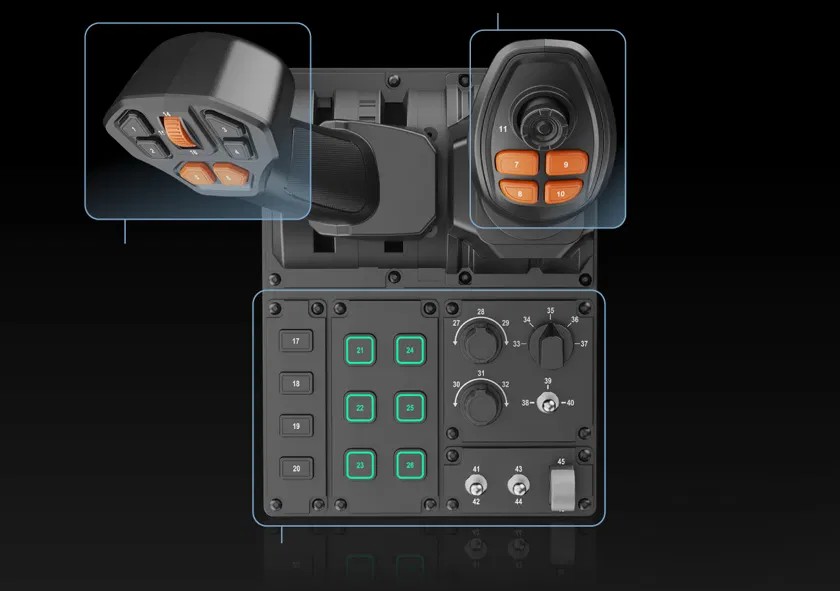
- 46 programmable inputs total
- Panel: 10 buttons, 3 rotary knobs, 3 toggle switches, 1 rocker switch
- Throttle: throttle/brake axis, 6 buttons, 1 thumb scroll wheel
- Joystick: 3-axis Hall-effect joystick, 6 buttons, 1 Hall-effect thumbstick
- 6 panel buttons with customizable 16.7 million color RGB lighting
- Modular grip system, compatible with Moza’s MA3X, MHG, and MH16 grips
- Dimensions: 205 mm x 201 mm x 266 mm
- Weight: 1,268 g (just under 3 lbs)
- Material: plastic
- Connection: USB-A to USB-B
- Platform: PC
- Price: $199 USD / 209 EUR
- Launch date: July 23, 2026
If you’re new to Moza’s ecosystem, their support documentation on Farming Simulator setup walks through the Pit House config process in more detail than we’ll cover here.
Setup and Build Quality
Getting the FCS running requires Pit House, Moza’s software. At review time that meant a beta firmware build, experimental version 1.3.0.9, since the unit isn’t publicly available yet. Once that update ran, the FCS showed up immediately. The plug and play claim held up: no drivers to hunt down, no manual axis mapping required just to get moving.
Assembly is straightforward. The joystick and throttle don’t come pre-attached. The joystick connector uses small alignment pins, similar to old wired mouse and keyboard connectors. Line them up carefully. Bend one and you’ve likely bricked that stick, so take the extra thirty seconds here.
Mounting was simple too. It bolted straight to an existing gear shift and handbrake plate using M4 screws. Even with just two screws installed, not all four mounting points used, the unit didn’t budge under normal use.
On build quality, the FCS is entirely plastic. That keeps the price down, and it isn’t a knock against it at $199. The buttons on the sticks themselves are tactile and responsive. The four lit panel buttons feel great. The four unlit buttons are noticeably softer, though nothing about them felt unreliable in testing.
How the Moza FCS Actually Drives
Here’s where the marketing language needs a reality check. Moza’s copy says vehicles are “automatically mapped and ready for action right out of the box.” That’s true in the sense that you can get in and drive almost anything immediately. It is not true in the sense that every function on every vehicle arrives correctly mapped.
A harvester, for example, worked essentially as intended, with most buttons already assigned. A Kubota tractor was a different story. Driving it worked fine out of the gate, but the front loader lift wouldn’t respond to any preset input. That meant going into Pit House and remapping the joystick manually. Steering also came in reversed from what felt intuitive, another quick remap fix.
None of this is a dealbreaker. Farming Simulator has well over 100 mappable functions across different vehicle types. That’s more than any single control panel could realistically preset out of the box. Remapping in Pit House is simple once you’re in there. But if you’re expecting zero setup regardless of what you’re driving, temper that expectation. Budget a few minutes per new vehicle type to check your mappings before you rely on them.
The Cons, Named Directly
- Preset mapping isn’t universal. Some vehicles need manual remapping despite the plug-and-play framing, particularly implement-specific functions like loader arms.
- Four of the panel buttons feel soft compared to the rest of the unit. Not a functional problem, just a tactile inconsistency worth knowing about.
- All-plastic construction is the tradeoff for hitting $199. It didn’t feel cheap in testing, but don’t expect metal internals at this price point.
- This review didn’t dig into Pit House’s telemetry-based lighting effects. That’s a deeper software feature that fell outside the scope of a first-look hands-on. If that’s a priority for you, look for more software-focused coverage before launch.
Final Thoughts on the Moza FCS Review
The FCS delivers on its core promise. One compact unit puts a Hall-effect joystick, a throttle, and a real button panel in front of you, at a price that doesn’t require a second mortgage. The plug-and-play claim holds up well enough to get you driving in minutes. It just doesn’t hold up perfectly across every vehicle you’ll eventually own. Build quality is solid where it counts. Setup is genuinely painless once Pit House is installed. The modular grip system means this isn’t necessarily a one-trick purchase if you’re already in Moza’s ecosystem.
Whether this makes sense for you comes down to how deep you already are into Farming Simulator or Construction Simulator. If you’re all in on tractors and harvesters, running an actual virtual farm, the FCS is a serious upgrade over a keyboard and controller. If you’re farm-sim-curious the way this review was, it’s a genuinely fun way to find out how deep that rabbit hole goes.